Why Your Shopify Store Needs a Product Recommendation Quiz to Boost Conversions and Collect Customer Data
Published 11/1/2025Last Updated 4/10/2026By Cyril Gaillard

Learn how a product recommendation quiz can transform your Shopify store by guiding customers, increasing conversions up to 40%, and collecting valuable zero-party data for targeted marketing. Follow our step-by-step guide to build, embed, drive traffic, and connect your quiz with marketing tools.
Discover how product recommendation quizzes on Shopify increase conversions, collect zero-party data, and personalize marketing to grow your ecommerce business.
Why Your Shopify Store Needs a Product Recommendation Quiz
If you run a Shopify store with more than a handful of products, you already know the problem: customers land on your site, browse for a few minutes, and leave without buying anything. The reason is almost always the same — too many choices and not enough guidance. A product recommendation quiz solves this by acting as a personal shopping assistant that narrows down your entire catalog to the handful of products each visitor actually needs.
The numbers speak for themselves. While the average ecommerce conversion rate sits between 2% and 4%, stores using product recommendation quizzes report conversion rates of 25–40% among quiz takers. Shoppers who interact with recommended products are 4.5x more likely to add items to their cart and complete a purchase. And brands like Jones Road Beauty have seen their average order value jump from $60 to $90 after implementing a "find your shade" quiz — a 50% increase.
Beyond conversions, quizzes collect zero-party data — information your customers voluntarily share about their preferences, needs, and goals. Unlike third-party cookies, this data is accurate, privacy-compliant, and immediately actionable for email segmentation and retargeting campaigns. When you connect your quiz to a platform like Fyrebox's integrations, this data flows directly into your marketing stack.
Step 1: Create Your Quiz with Fyrebox
Head to Fyrebox and create an account if you don't already have one. Once inside the dashboard, you can either build a quiz from scratch using the quiz maker or generate one instantly with the AI quiz maker, which analyzes your topic and creates questions for you in under five minutes.
For a product recommendation quiz, you'll want to think about the decision factors your customers care about most. A skincare brand might ask about skin type, primary concerns, and daily routine. A coffee subscription might ask about roast preferences, brewing method, and flavor notes. Keep it between 5 and 8 questions — long enough to personalize, short enough to hold attention. Research shows quizzes in this range hit the sweet spot for completion rates of 40–60%.
Map each answer combination to the right products from your Shopify catalog. With Fyrebox, you assign point values to each answer so that at the end of the quiz, the products with the highest scores are the ones recommended to your customer. This logic ensures every visitor gets a tailored result without you needing to code anything.
"Shoppers who complete a quiz arrive at the results page with intent. They've invested time, answered questions, and received a recommendation tailored to them. That confidence converts at a much higher rate than passive browsing."
— RevenueHunt, Product Quiz Metrics Report
Step 2: Embed the Quiz on Your Shopify Store
Once your quiz is ready in Fyrebox, adding it to Shopify takes just a few minutes. You'll embed it using an HTML code block on any Shopify page. Here's how:
First, go to your Shopify admin dashboard and navigate to Sales Channels → Online Store.
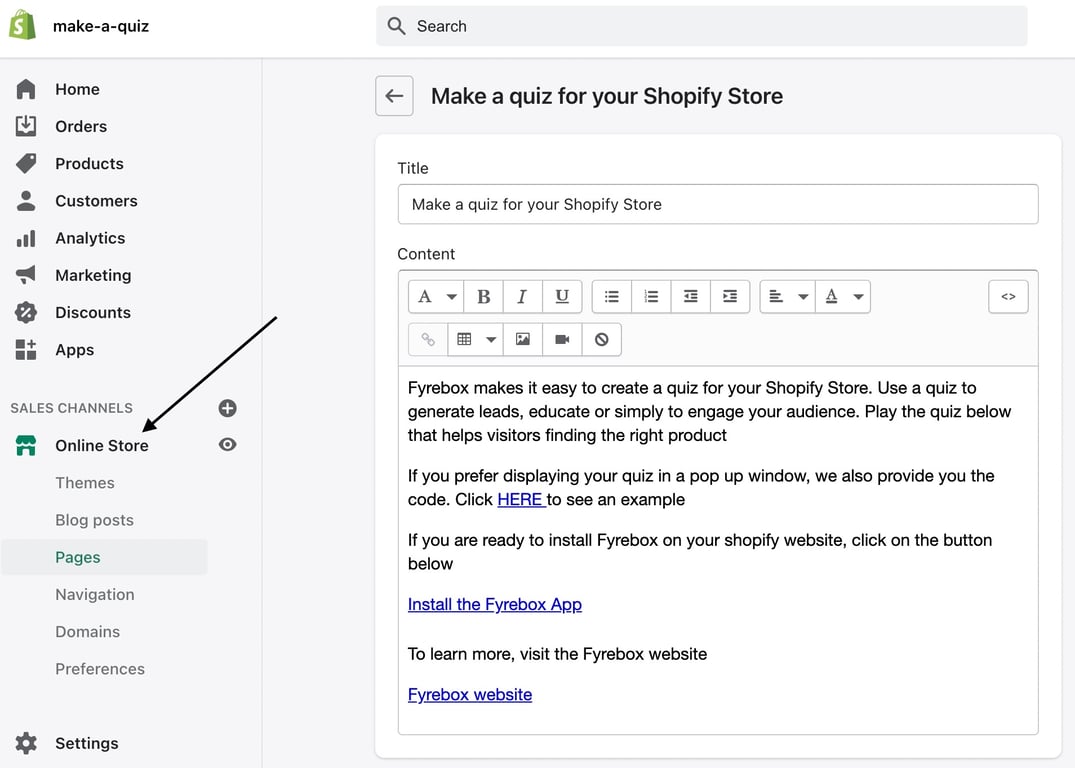
Next, go to Pages and click Add page to create a new page for your quiz (or choose an existing page where you'd like the quiz to appear).
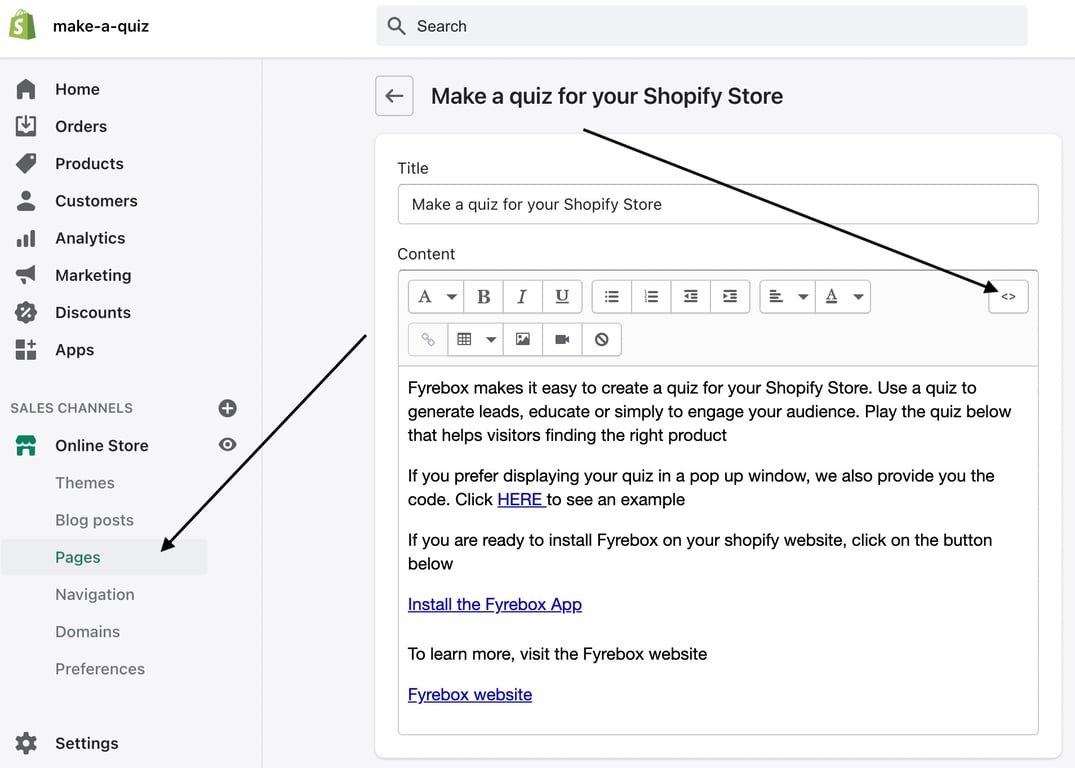
In the page editor, click the Show HTML button (the < > icon) to switch to the source code view. Paste the Fyrebox embed code into the HTML box, then save your page.
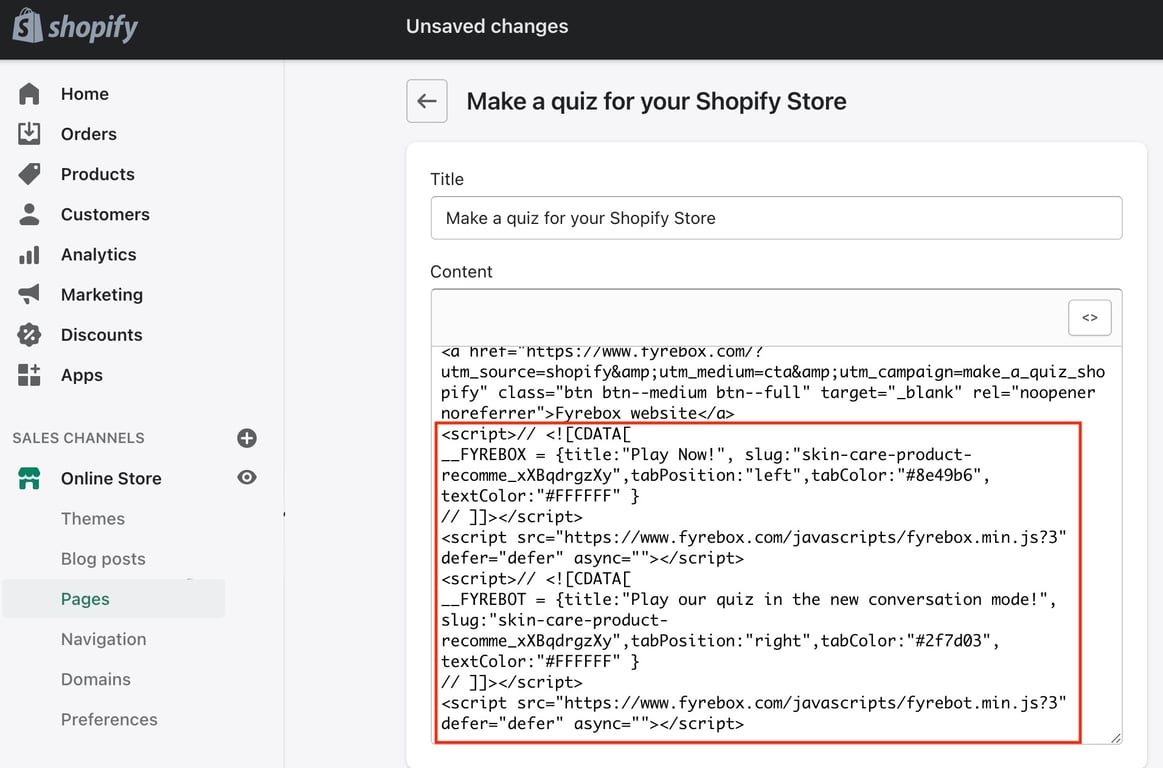
Your quiz is now live. You can find it at your store's URL followed by the page path you chose. For a complete walkthrough with more detail, visit the Fyrebox Shopify help page.
Step 3: Drive Traffic to Your Quiz
A great quiz does nothing if nobody takes it. The most effective Shopify stores position their quiz prominently — not buried three clicks deep. Add a link to your quiz in your store's main navigation menu so it's visible from every page. Consider labeling it something inviting like "Find Your Perfect Match" or "Take the Quiz" rather than something generic.
Beyond navigation, there are several high-impact placements that work well. Feature the quiz as a banner or hero section on your homepage. Add it to product collection pages where customers are most likely to feel overwhelmed by options. Include a link in your post-purchase email sequence — customers who loved their first recommendation will happily come back for more. You can even use the quiz as a lead magnet in social media ads, which tends to generate email opt-in rates 15–20x higher than traditional popups.
Step 4: Connect Your Marketing Tools
The real power of a product recommendation quiz goes far beyond the initial purchase. Every quiz response is a goldmine of customer intent data. When you integrate Fyrebox with your email platform, you can automatically segment subscribers based on their quiz answers and send hyper-targeted follow-up campaigns.
Fyrebox connects with popular tools through its integrations page — including email marketing platforms, CRMs, and analytics tools. For example, if a customer tells your quiz they have sensitive skin, you can trigger an automated email series featuring your gentlest products, care tips, and relevant blog content. Research from McKinsey shows that this kind of personalization strategy typically increases revenue by 10–15%, and for direct-to-consumer brands, up to 25%.
You can also use quiz data to reduce returns. When customers buy the right product on the first try because a quiz guided them to it, return rates drop — especially valuable in categories like skincare, supplements, footwear, and apparel where sizing and suitability are common pain points.
Best Practices for High-Converting Shopify Quizzes
After looking at what the best-performing Shopify quizzes have in common, a few patterns emerge. First, keep your quiz visual. Use product images, lifestyle photos, or icons as answer options whenever possible. Visual quizzes feel faster and more engaging than walls of text, and they give customers a taste of your brand aesthetic before they even see the results.
Second, match your quiz design to your store's brand. A quiz that looks like it belongs on a completely different website breaks trust. With Fyrebox's customization options, you can adjust colors, fonts, and layouts so the quiz feels like a natural extension of your Shopify theme.
Third, show products directly in the results. Don't just tell customers what to buy — show them the product image, price, and a direct "Add to Cart" link. Every extra click between the recommendation and the checkout is a chance for the customer to drop off. The goal is to make the path from quiz result to purchase as frictionless as possible.
Finally, treat your quiz as a living tool, not a set-it-and-forget-it widget. Review your quiz analytics regularly to see where people drop off, which products get recommended most, and which recommendations actually convert. Use those insights to refine your questions and product mappings over time.
Build Your Shopify Product Quiz Today
Create a product recommendation quiz in minutes with Fyrebox — no coding required. Guide your customers to the right products, collect valuable data, and watch your conversion rates climb.
Create Your Free QuizShopify Product Quiz Ecommerce Conversion Rate Lead Generation